今すぐ
All templates

AI Stadium Broadcast Template

One still, one broadcast-grade moment.

Edition 06 — A two-step broadcast clip

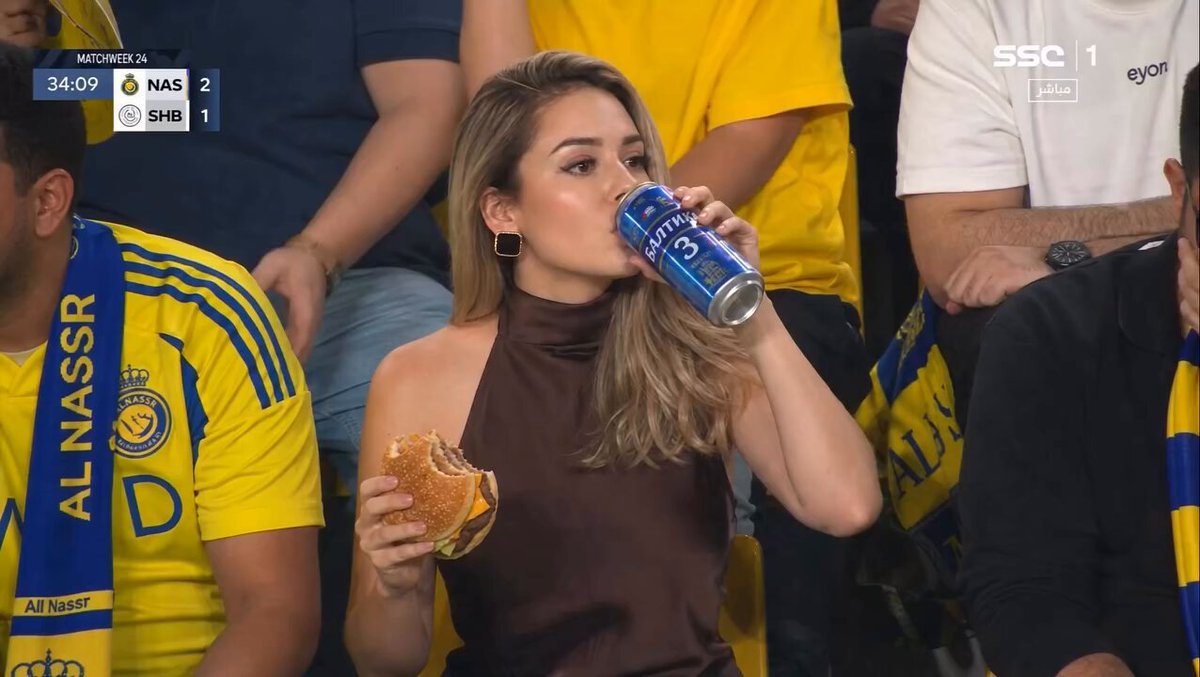
Step one writes a hyper-realistic broadcast still — a glamorous fan in the stands during a packed night match, with team-color crowd contrast, broadcast overlay, and a network watermark. Step two hands that frame to Seedance i2v and renders a fifteen-second live-broadcast clip with subtle handheld camera, crowd motion, and authentic in-game energy. The whole thing happens in the console below.

Models
GPT Image 2 · Seedance 2.0
Output
15 sec · 16:9 · broadcast
Run time
≈ 4 min end-to-end
T—06 / STADIUM
Step 01 — broadcast still
Step 01 — broadcast still1 / 1
Step 02 — final clip0:15
45

02 — INSIDE

Two prompts, one workflow

One fan, one stadium, zero uncanny.

The prompts below are the verbatim source. Copy them into the console above and tweak the fan, team colors, or stadium.

Broadcast still

Hyper-realistic fan in the stands, mid-game

1,716 charsgpt-image-2
Use the provided broadcast still as reference.

CONCEPT:
Live football broadcast cut — 15 seconds of mid-game crowd-camera energy on the same glamorous woman from the reference still.

CHARACTER LOCK:
Same face, same hair, same dark brown sleeveless high-neck satin top, same black square earrings as the reference. Do not change identity, do not duplicate her.

SCENE:
Packed night-match football stadium crowd around her — fans in bright yellow and blue jerseys and scarves, full seating tiers visible. Broadcast overlay graphics (score, timer) anchored top-left and a sports network watermark anchored top-right, both holding stable through the cut.

ACTION TIMELINE:
0:00–0:03 — Subtle handheld push-in. She glances toward the field, takes a casual sip from the tall blue aluminum can.
0:03–0:06 — Crowd reaction beat. Cheers around her, she half-smiles, lifts the cheeseburger toward her mouth.
0:06–0:09 — Takes a bite, fans behind her stand and wave a scarf overhead, slight camera reframe.
0:09–0:12 — Brief locked-off shot. She lowers the burger, looks back at the game, sips again from the can.
0:12–0:15 — Cheer hits, she laughs and turns slightly to the friend beside her, broadcast camera holds, overlay graphics flash.

CAMERA:
Mid-shot to medium close-up, subtle broadcast handheld realism, very shallow depth of field, no fast cuts, no whip pans — keep the energy of a live broadcast operator following her.

LIGHTING:
Natural arena floodlights, slight cool kiss on her hair, warm stadium glow on the crowd, no extra studio relight.

RESTRICTIONS:
No new text, no caption overlays beyond the existing score and timer, no logo changes, no slow-motion gimmicks, no anime stylization, no identity drift.

What the AI stadium broadcast template does

The AI stadium broadcast template is a two-pass workflow that produces a 15-second hyper-realistic live-broadcast clip from text alone. The first pass writes a single broadcast still of a fan in the stands during a packed night match, complete with team-color crowd contrast, overlay graphics, and network watermark. The second pass animates that frame into a clip with authentic in-game camera motion and crowd energy.

You run the AI stadium broadcast template inside the console above. Step one calls GPT Image 2.0 with a hyper-realistic broadcast brief. Step two hands the frame to Seedance 2.0 image-to-video. Swap the fan, swap the teams, hit generate, ship the AI stadium broadcast template's final clip.

Broadcast aesthetic

Overlay graphics, network watermark, broadcast camera angle — the AI stadium broadcast template nails the look.

Team-color contrast

Bright jersey-color crowd surrounding the fan. Strong frame composition.

Subject lock

Same fan face, hair, wardrobe across the still and the video from the AI stadium broadcast template.

Mid-game energy

Subtle handheld realism. Crowd ambient motion. Fan candid micro-expressions.

Anyone shipping short-form sports-adjacent content where broadcast realism is the punchline.

Who uses the AI stadium broadcast template

Sports brands

Drop a culture-around-the-game spot. The AI stadium broadcast template handles the fan, the crowd, and the broadcast look.

Beverage and snack brands

Game-day product moment — beer can, snack reach, halftime sip. The AI stadium broadcast template makes it native broadcast.

Sports media creators

B-roll for game recaps without licensing fees. The AI stadium broadcast template fills the crowd-shot gap.

Brand creators

Drop a fake-broadcast meme clip. The AI stadium broadcast template's authenticity is the whole joke.

Why the AI stadium broadcast template beats a stadium shoot for short-form broadcast-style content where production access is the bottleneck.

AI stadium broadcast template vs. shooting at a real game

AI stadium broadcast template
Real game shoot
Production time
Two prompts. About four minutes end-to-end.
Stadium credentials, a real game, broadcast-quality gear, and a crew.
Cost per clip
Credits only — see credit pricing.
Tickets, credentials, broadcast cameras, crew, and edit.
Scene control
Locked by the reference still — every detail intentional.
You shoot what happens. No control over crowd, lighting, or moment.

AI stadium broadcast template — common questions

What is the AI stadium broadcast template?

+

The AI stadium broadcast template is a paired prompt: a GPT Image 2.0 brief that produces a hyper-realistic broadcast still of a fan in the stands with team-color crowd contrast, overlay graphics, and network watermark, and a Seedance 2.0 i2v shot list that animates that still into a 15-second live-broadcast clip with subtle handheld camera motion. Both prompts are on this page and free to remix.

Do I need stadium photos?

+

No. Step one of the AI stadium broadcast template generates the stadium scene for you, including crowd, lighting, and overlay graphics. If you already have a usable broadcast still, skip step one.

Can I change the team colors?

+

Yes. Edit the team-color description in both step-one and step-two prompts. The AI stadium broadcast template works for any matchup — soccer, basketball, baseball, esports — just swap the crowd palette and overlay.

How long does one AI stadium broadcast template run take?

+

About four minutes end-to-end on Seedance 2.0 Fast. Step one (the broadcast still) takes around a minute. Step two (the 15-second video) takes around three.

What aspect ratio does the AI stadium broadcast template output?

+

16:9 landscape — native broadcast. Drops cleanly into YouTube and broadcast-style social cuts.

Will the fan stay the same across the still and video?

+

Yes — the AI stadium broadcast template's step-one brief explicitly locks face, hair, and wardrobe. The video pass uses the still as a reference image so identity holds across cuts.

Can I use real team logos or league marks?

+

The AI stadium broadcast template's default prompt avoids real league trademarks. If you want to add a specific team or league, do it at your own risk and check your local IP rules first.

Is the AI stadium broadcast template safe for commercial use?

+

Generations from seedance2.so are yours to use. Strip the broadcast watermark if your context is not parody, and avoid trademarked team marks in the AI stadium broadcast template prompt for brand-safe deliveries.

4 LEVERS

Make it yours

Sport

Swap football for basketball, baseball, esports, or motorsport. The AI stadium broadcast template's structure stays — only the crowd, overlay, and arena change.

Fan

Update the fan description in step one — age, style, wardrobe. The AI stadium broadcast template propagates the lock into the video.

Atmosphere

Day match, night match, championship final, regular season — change the lighting and overlay copy in both prompts.

Cost

~1 image generation plus 1 image-to-video pass. Current credit rates live on each model page.

Once you've tuned a broadcast moment you like, save the prompt pair and re-run for every team, season, or sport.

Ship the AI stadium broadcast template today

Two prompts, one console, one render. Broadcast still, then video — or browse all AI workflow templates.