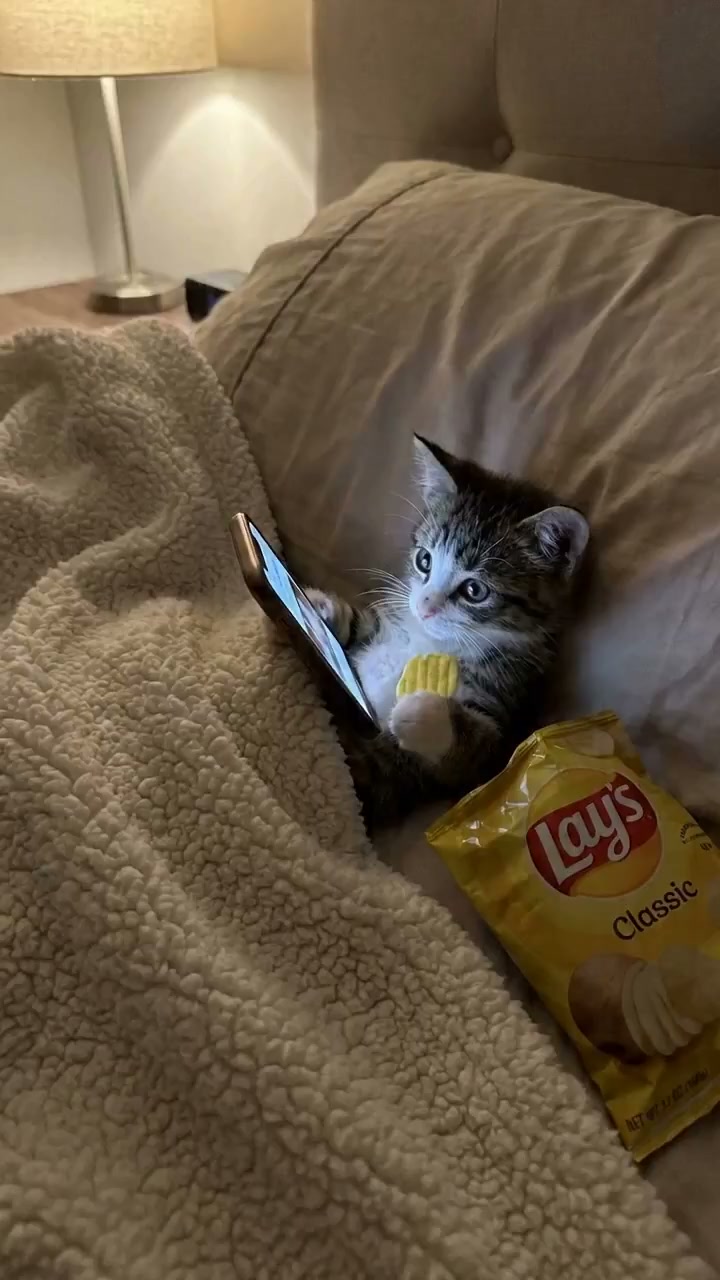
Step one writes a low-fi phone-photo of a tabby-and-white kitten doomscrolling in bed under a sherpa fleece — one paw on the phone, one paw in a yellow chip bag. Step two hands that frame to Seedance 2.0 i2v and scripts a 7-shot tantrum: doomscroll, hand-grab, dilated freeze, full wail with chips flying, sulk on tummy, single-tear close-up, then loop. The whole loop happens in the console below.
Models
Nano Banana Pro · Seedance 2.0
Output
15 sec · 9:16 · 7 shots
Run time
≈ 3 min end-to-end
T—08 / TANTRUM-KITTEN
OUTPUT REFERENCE
AI kitten character sheetSeedance 2.0 tantrum kitten output0:15
45
Two prompts, one viral loop
One kitten, seven shots, zero drift.
The trick to a believable tantrum loop is anchor-frame discipline. Nano Banana Pro writes the start frame as a deliberately low-fi SD phone-photo — every prop in its final position. Seedance 2.0 i2v then runs all 7 shots off that same anchor: same kitten, same blanket, same chips, same phone glow. No identity drift between shots, no costume change, no rebuilt set — just camera, motion, and emotion shifting.
AI kitten character sheetnano-banana-pro
STEP 01Anchor frame, locked
Write the SD phone-photo of a doomscrolling kitten
The Nano Banana Pro prompt is engineered for low-fi authenticity: tiny fluffy tabby-and-white kitten, on its back, blanket burrito under thick white sherpa fleece, one paw holding a glowing smartphone, one paw on a single yellow potato chip, open yellow chip bag beside it, warm bedroom lighting, shallow depth of field, no timestamp. That last bit matters — a real phone shot has no overlay text, and the LLM will add one if you don't suppress it.
Verbatim prompt
Anchor frame, locked
551 charsnano-banana-pro
A poor SD phone photo, realistic low-quality photo of a tiny, fluffy tabby-and-white kitten lying on its back tucked under a thick, white sherpa fleece blanket. The kitten is holding a small smartphone in one paw and looking at like how humans doomscroll in their night time bed before sleep and a single yellow potato chip in the other, looking at the screen with wide, curious eyes. Next to the kitten is an open yellow bag of potato chips (only one packet). Soft, warm indoor lighting, cozy bedroom atmosphere, shallow depth of field. No Timestamp.
Model — nano-banana-pro
STEP 027 shots, one anchor
Script the doomscroll → grab → wail → sulk → loop
The Seedance 2.0 i2v prompt is a 7-shot screenplay with sound design notes. Each shot specifies camera angle (top-down → close-up → medium → low-angle eye-level), action beats, and audio (crunching → record scratch → silence → baby cry → whimpers → sad violin). Shot 7 loops back to Shot 1 so the clip is infinitely re-postable. The reference image keeps the kitten, blanket, phone, and chip-bag position locked across every shot.
Verbatim prompt
7 shots, one anchor
2,042 charsseedance-2-beta
SHOT 1:
Camera: Top-down, static
Kitten tucked in blanket burrito, exactly like the start frame. Phone glowing on its face. One paw lazily swiping up on the phone. Other paw reaching into the chip bag, bringing a chip to mouth. Slow crunching. Eyes glazed over, totally zoned out. Maybe a tiny crumb falls on its chest — doesn't care.
Sound: Soft crunching, faint TikTok-style audio bleeding from the phone

SHOT 2:
Camera: Same top-down, slight zoom in
A human hand enters frame from the top. Swiftly grabs the phone out of the kitten's paw. Kitten's eyes go WIDE — pupils fully dilated. Freeze frame for a split second. The chip falls from its other paw in slow motion. Mouth hangs open.
Sound: Record scratch or dramatic "dun dun" sting

SHOT 3:
Camera: Close-up on the kitten's face
Kitten stares at its now-empty paw. Looks up at where the phone was. Looks at the empty paw again. Bottom lip starts to quiver. Eyes get glassy and watery.
Sound: Dead silence… then a tiny squeaky inhale

SHOT 4:
Camera: Pulls back to medium shot, slight shake/handheld feel
Kitten opens its mouth and WAILS — full baby cry. Legs start kicking wildly under the blanket. Chips go flying everywhere. Little fists balling up. It rolls onto its side, kicks the chip bag off the bed. Dramatic flailing — like a toddler in a grocery store.
Sound: Actual baby crying sound effect layered with tiny kitten mews

SHOT 5:
Camera: Same medium shot
Kitten rolls fully onto its tummy, face buried in the blanket. Kicks its back legs a few times. Pounds one tiny fist on the mattress. Then goes still for a beat — dramatic sulking.
Sound: Crying fades to pathetic little whimpers

SHOT 6:
Camera: Low angle, kitten's eye level
Kitten slowly turns its head toward camera. One tear rolling down. The most devastated, betrayed face imaginable. Holds eye contact.
Text overlay: "give it back."
Sound: A single sad violin note, or the "oh no" TikTok sound

SHOT 7:
Cut back to Shot 1, the kitten has somehow gotten the phone back, munching chips again like nothing happened.
Model — seedance-2-beta
Seedance 2.0 tantrum kitten outputseedance-2-beta
AI kitten character sheet
What is the AI tantrum kitten template?
The AI tantrum kitten template is a chained two-step workflow on seedance2.so that pairs a Nano Banana Pro start frame with a Seedance 2.0 i2v 7-shot screenplay to produce a 15-second viral pet-tantrum loop in 9:16. It's a pre-engineered Reels / TikTok / Shorts asset — you re-skin the pet, the room, or the prop and the rest of the meme structure carries the comedy.
Both models run inside seedance2.so from one prompt console — no model-hopping, no API juggling. The same pipeline backs
Low-fi by design
The SD phone-photo aesthetic is the joke — a slick studio shot kills the meme. Nano Banana Pro's prompt forces the low-quality look.
Anchor-frame consistency
All 7 shots derive from the same start frame, so the kitten, blanket, phone, and chip bag stay locked even through wails and kicks.
Sound design built in
Each shot specifies audio (crunching, record scratch, baby cry, sad violin) so the editor doesn't have to source SFX after generation.
Loop-ready cut
Shot 7 returns the phone and resumes the doomscroll — the same clip can be reposted with zero re-edit and still read as a complete beat.
Comedy formats and pet content where the doomscroll-meltdown loop is already proven to travel.
Where the tantrum kitten template lands
Pet meme accounts
Re-skin the kitten as a puppy, hamster, or ferret. Same prop layout, same meltdown beats. Daily-output formula for an animal-comedy account that needs 4-6 clips a week.
Reels / TikTok / Shorts
9:16, ~15 seconds, loop-able cut, captioned. Drops straight into vertical-first platforms with no aspect-ratio surgery. The tear-on-camera close-up is the swipe-stop hook.
Brand parody / SaaS marketing
Swap the chip bag for your competitor's product to dramatize "we took it away." Works for ad creative, demo cold-opens, and product-killed announcement memes.
Parenting-relatable humor
The kitten as toddler proxy. The 7-shot beat (doomscroll → tantrum → sulk) is universal parenting body language — feed it to parent-creator pages or family-comedy accounts.
Real cats don't perform on schedule, and the chip-flying continuity alone would take hours of takes. The AI tantrum kitten template gives you a directed clip — no animal handler, no SFX library, no repeat takes.
Why this beats trying to film an actual cat meltdown
AI tantrum kitten template
Real cat shoot
Performance control
Scripted across all 7 shots — wail at 0:06, sulk at 0:10, betrayed close-up at 0:13. Exactly the beats you wrote.
Cat does what cat wants. You wait 4 hours for the wail and the chip-grab never lines up.
Sound design
Crunching, record scratch, baby cry, sad violin — all specified in the prompt and rendered with the video.
Source SFX library, time-align in editor, hope the baby-cry overlay reads as comedic and not unsettling.
Run time end-to-end
≈ 3 minutes from prompt to final clip. Re-skin the pet and rerun.
Multi-hour shoot, snack cleanup, exhausted cat. One clip, no variants.
AI tantrum kitten template — FAQ
Why does the start frame look low-quality?
+
It's intentional. The "poor SD phone photo" line in the Nano Banana Pro prompt is what sells the meme — viewers read the clip as a real phone capture, which is the comedy. A clean, well-lit studio shot would break the format. Don't change that line.
Can I swap the kitten for another animal?
+
Yes. Replace "tiny, fluffy tabby-and-white kitten" with the species and look you want — puppy, hamster, bunny, ferret. Keep the blanket burrito pose, the phone, and the chip bag intact so the 7-shot screenplay still tracks. Rerun both steps.
Why is there no separate reference image?
+
Because the start frame is literally the first frame of the final video. Nano Banana Pro produces it, Seedance 2.0 i2v animates from it. You don't need a second image — the template uses one anchor frame for all 7 shots so the kitten, blanket, and prop positions never drift between cuts.
How long does the whole template take to run?
+
About 3 minutes end-to-end on seedance2.so — roughly 30-45 seconds for the Nano Banana Pro start frame and 1.5-2 minutes for the Seedance 2.0 i2v 7-shot render. Faster than waiting for a real cat to perform on cue.
Does the clip come with sound, or do I add audio in post?
+
Seedance 2.0 renders sound described in the prompt — crunching, record scratch, baby cry, whimpers, sad violin. Each shot in the prompt has a Sound line specifying what audio the model should generate or imply. For final polish you can still layer a louder SFX in your editor, but the base clip ships with audio.
Why 7 shots and not just one continuous take?
+
The comedy of a tantrum loop is in the cuts — the freeze on Shot 2, the silence into wail transition on Shot 3 → 4, and the betrayed close-up on Shot 6. A single continuous take buries those beats. 7 short shots is the meme grammar Reels / TikTok / Shorts viewers expect.
Can I post the output commercially?
+
The clip you generate is yours to use. Check the current terms on the seedance2.so pricing page for the exact commercial-use scope of your plan. The verbatim prompts in this template are released to be re-skinned and re-prompted freely.
What aspect ratio is the final video?
+
9:16 vertical, 720×1280 — sized for Reels, TikTok, and YouTube Shorts without resizing. If you need 16:9 or square cuts for other placements, rerun Step 2 with the orientation override in the Seedance 2.0 i2v console.
Four levers, infinite variants
Re-skin the tantrum kitten template
Subject swap
Swap the kitten for a puppy, hamster, ferret, or even a chibi toddler — keep the blanket burrito and the chip bag so the 7-shot beats stay legible.
Object swap
The phone can become a tablet, a remote, a controller, a treat bag. The thing being taken away is the meme's punchline — swap it for whatever your audience grieves losing.
Vibe shift
Cozy bedroom is the default. Try a sterile dentist's chair, a high-school locker, or a beach towel for tonal contrast against the tantrum.
Sound design swap
Trade the baby cry for an opera aria, the sad violin for a kazoo, or the record scratch for a vinyl skip. Audio carries half the joke — own that layer.
The 7-shot screenplay is the chassis. The kitten, the chips, the phone, and the sound design are all swap-able knobs that re-skin the meme without rebuilding the structure.
Generate your tantrum kitten loop
Open the prompt console at the top of this page, paste the AI tantrum kitten template, and run both steps back-to-back. The 7-shot meltdown ships in 9:16 with sound, ready to post.